
Resto
Restaurant management with POS, KDS, waiter app, QR ordering, inventory and accounting in one install.
Resto runs a whole restaurant from one self-hosted Laravel install: the till, kitchen screens, a waiter app, QR table ordering, an online store, recipe-based inventory, supplier accounts, payroll and double-entry books. Every part comes in the one purchase, with no paid add-ons and no monthly fee, and it runs on ordinary shared hosting.
- One-time payment
- Lifetime updates
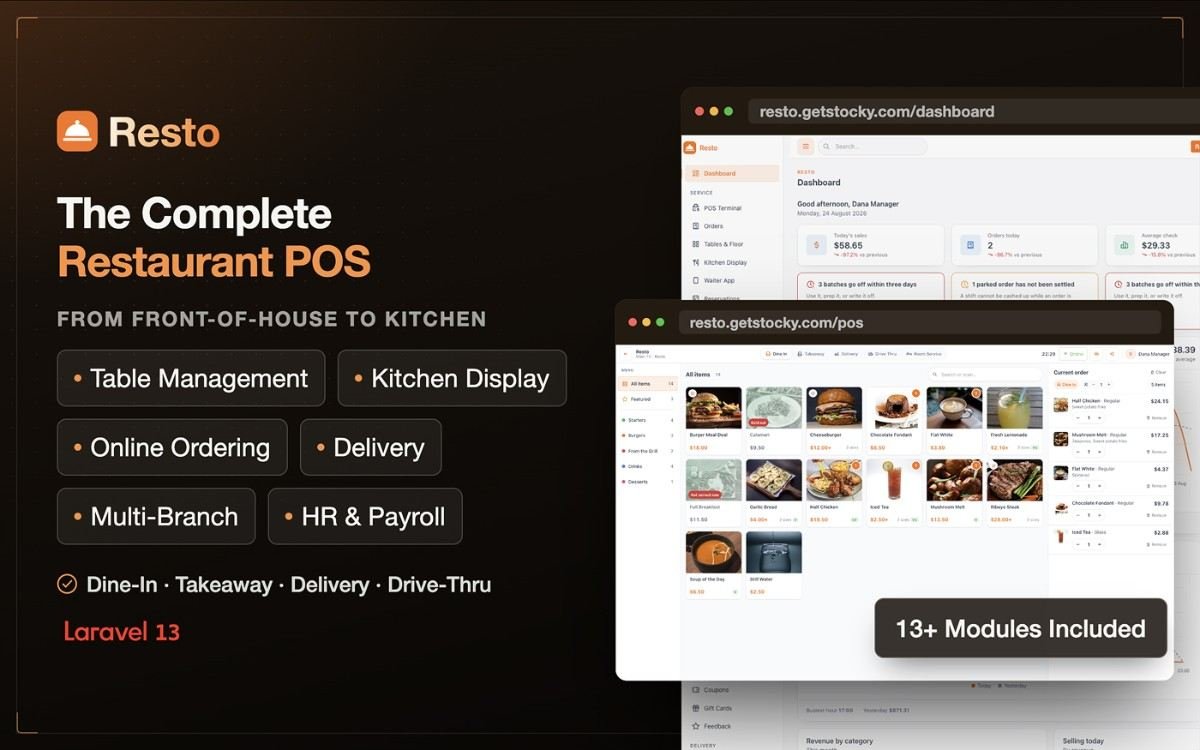
One install, the whole restaurant
A separate POS system
A touchscreen till with modifiers, combos, split payments, loyalty and an offline mode that keeps taking orders.
A kitchen display subscription
Station screens that colour late tickets, bump and recall, plus an order-status TV for waiting guests.
Print servers and printer drivers
The included Windows Print App sends receipts and kitchen tickets to the right printer without a print dialog.
Spreadsheets for stock and food cost
Recipes deduct ingredients on every sale, sold-out dishes leave the menu on their own, and suppliers get real statements.
A bolt-on accounting tool
Sales, refunds, purchases, supplier payments and payroll post themselves to double-entry books.
Ordering, booking and app-builder services
QR table ordering, an online store, reservations, WhatsApp alerts and installable apps for staff and guests.
How it works
Every part of the restaurant, already connected
01 — Point of Sale
A touchscreen till that keeps selling offline
Modifiers with rules, combos, five order types, split and partial payments, tips, coupons, gift cards and loyalty points at the till. Every discount needs a reason and can require a manager PIN. If the connection drops, orders wait on the device and sync as soon as it returns.
02 — Kitchen Display System
Each station sees only its own tickets
Grill, fryer, cold and pass each get their own board, with timers that turn amber and then red when a ticket runs late. Bump, recall or mark items ready, voided orders clear themselves, and a TV screen shows guests which orders are being prepared and which are ready.
03 — Tables, Waiter App & QR
The floor, the waiters' phones and the table QR codes in one live view
Lay out floors with drag and drop and group tables into waiter sections. Waiters take orders and payments at the table from an app on their phone and mark dishes served one by one. Guests scan the table's QR code to order, call a waiter or ask for the bill.
04 — Printing
Silent receipts and kitchen tickets with the free Print App
The included Windows app turns one PC into the print hub: receipts print with no dialog, every kitchen ticket goes to its station's printer, the cash drawer opens on its own, and QR and waiter orders print even with no browser open. Plain browser printing on 58 mm or 80 mm paper works with nothing installed.
05 — Inventory & Purchasing
Recipes take the stock out and work out the food cost
Recipes and sub-recipes deduct ingredients exactly once per sale, and a void or refund puts them back. When something runs out, the dishes that need it leave the menu until you restock. Purchase orders, goods received at landed cost, stocktakes, waste and branch transfers are all built in.
06 — Supplier Accounts
Know exactly what you owe each supplier
Every supplier gets a statement of deliveries, payments and adjustments with a running balance, ready to print or send. Match payments to deliveries, see overdue amounts aged into five buckets, and every supplier payment posts to the books.
07 — Online Ordering & Guests
Your own ordering site, reservations and WhatsApp updates
A menu search engines can read, for collection, delivery and table orders, with Stripe Checkout and delivery zones that set their own fees. Guests book tables online, can add the shop to their home screen, and get WhatsApp or email messages when food is ready, out for delivery or a booking is confirmed.
08 — Accounting & Reports
Books that post themselves, reports an owner can act on
Sales, refunds, purchases, supplier payments, wastage and payroll post to double-entry books with a trial balance, P&L and balance sheet. Sales, food cost, menu engineering, inventory and tax reports all export to CSV, and a summary of yesterday arrives by email every morning.
09 — Staff, Shifts & Payroll
Run the team without a separate HR system
Eight built-in roles, each opening on its own screen, with PIN clock-in, shift cash-ups, leave requests and payroll runs covering hours, overtime, commission and tips. Staff install Resto as an app on any phone, tablet or computer.
Before you install
Server requirements
PHP
8.3 or newer
8.3 and 8.4 tested
Database
MySQL 5.7+ or MariaDB 10.3+
Web server
Apache or Nginx
URL rewriting enabled, document root at /public
Extensions
bcmath, ctype, curl, dom, fileinfo, gd, json, mbstring, openssl, pdo_mysql, tokenizer, xml
storage/ and bootstrap/cache/ must be writable
SSL
Recommended, required for Stripe and the apps
Card payments and installing the apps need HTTPS
No extra infrastructure
No Node, Redis, WebSockets, queue workers or exec()
Kitchen screens and dispatch poll for changes instead of holding a socket open
Print App (optional)
A Windows PC
Only for silent printing, kitchen routing and the cash drawer
The installer checks every requirement before it starts. Full install guide: documentation.
Pricing
Choose your licence
Regular License
$21
one-time
- End user can not be charged.
- Only for one personal project.
- You can modify source code.
- You can not sell service/subscription.
- You can not sell source code directly to anyone.
Extended License
$129
one-time
- End users can be charged, including by subscription.
- One licence covers one project: yours or one client's.
- Each additional client or project needs its own licence.
- You can modify the source code.
- You can not resell or redistribute the source code.
What's new
Release notes
-
1.1 Installable apps, Print App, waiter workflow and supplier accounts
Staff and customer apps that install from the browser. The Resto Print App for Windows. Waiter sections and ordering and payment at the table. QR call-waiter and request-bill buttons. A supplier ledger with statements, ageing and a payables report. Online reservations, WhatsApp notifications, a customer-facing display, manager-approved discounts, automatic 86, an order-status TV screen, a daily summary email and a redesigned dashboard. Receipts on 58 mm and 80 mm with no duplicate kitchen tickets, and refunds and supplier payments now post to the books.
-
1.0.0 First release
POS with offline mode, kitchen display, tables, recipe-based inventory, purchasing, online store, delivery, reservations, HR and payroll, double-entry accounting, reports and a REST API.
Questions
Frequently asked questions
Are there paid modules or add-ons?
No. Inventory, kitchen printing, the Print App, WhatsApp, loyalty, the installable apps, supplier accounts and accounting all come with the single purchase.
Do I need to publish an app on the App Store or Google Play?
No. Staff and guests install the apps straight from the browser on Android, iPhone, iPad, Windows or Mac, with your name, icon and colours. Your site only needs HTTPS.
Which printers does it work with?
Any printer your device can already print to from the browser, on 58 mm or 80 mm paper. For silent receipts, kitchen ticket routing and the cash drawer, install the included Resto Print App on a Windows PC.
Does the POS work offline?
Yes. The terminal keeps loading without a connection, orders wait on the device, and they sync automatically when the connection returns, without ever creating the same order twice.
Does it run on shared hosting?
Yes. If your host runs PHP 8.3 and MySQL or MariaDB, Resto runs there. It needs no Node, Redis, WebSockets, queue workers or exec().
Does inventory update automatically?
Yes. Recipes and sub-recipes take ingredients out of stock on every sale, exactly once, and voids or refunds put them back. When an ingredient runs out, the dishes that need it come off the menu until you restock.
Can guests order from their table?
Yes. Each table gets a QR code. Guests scan it to see the menu, order and pay, and can tap to call a waiter or ask for the bill. The order prints in the kitchen on its own.
Can it track what I owe suppliers?
Yes. Every supplier has a statement with deliveries, payments, adjustments and a running balance. You can match payments to deliveries, see overdue amounts by age, and supplier payments post to the books.
Does it include accounting?
Yes. Double-entry books post themselves from sales, refunds, purchases, supplier payments, wastage and payroll, with manual journals, trial balance, P&L, balance sheet and period close.
Does it send WhatsApp messages?
Yes, through Meta's official WhatsApp API: when an order is ready or out for delivery, when a booking is confirmed, as a booking reminder, and when a table is ready. Email works too.
Does it support reservations?
Yes. Guests book online and can cancel from their own booking link. Staff work from a day-by-day book with table assignment, configurable slot and turn times, and a waitlist for walk-ins.
How many languages does it support?
Eight: English, French, Spanish, German, Portuguese, Turkish, Hindi and Arabic, with full right-to-left layout for Arabic. A built-in editor lets you add or change translations without touching a file.
Does it support multiple branches?
Yes. Each branch has its own stock, tables, terminals, staff, prices, taxes and opening hours, with transfers between branches and reports per branch or for the whole business.
Does it take online payments?
Yes. Stripe Checkout handles card payments, so card numbers never touch your server. Cash on delivery and pay-at-counter are supported too.
Is there a REST API?
Yes. A versioned, token-authenticated API covers menu, orders, stock, ingredients, customers, reservations and a business summary. Tokens are scoped by permission and rate-limited per token.
Can I sell Resto as a subscription or set it up for clients?
With the Extended Licence you can charge your own customers, including running Resto as a subscription service, within one project. Every project needs its own licence: if you set Resto up for a client, that client needs a licence, and a second client or a second project needs another. Reselling or redistributing the source code is not allowed under either licence.
Are updates free?
Yes, every future update is included. Updating means copying the new files and running the database migration.
Can you install and host it for me?
Yes. Managed hosting is $12 a month: we host Resto on our dedicated servers, manage the server and install it for free, and you only buy a domain. Prefer your own hosting? We can do the installation for a one-time $50.
Reviews
 Finally, a POS System That Doesn't Get in the Way
After trying out a handful of POS solutions over the past year, this one is the first that actually feels like it was built by people who understand how a busy checkout counter really works. Nothing about it feels bolted on or forced — every screen, every button, every workflow just makes sense the moment you touch it.
Setting up my inventory took a fraction of the time I expected, and syncing sales data across multiple locations has been surprisingly painless. The reporting dashboard alone has saved me hours each week that I used to spend piecing together spreadsheets.
What really sold me, though, was how the whole thing scales. It works just as well for a single small shop as it seems built to handle a multi-branch operation. That kind of flexibility is rare to find without paying enterprise-level prices.
If you're on the fence about which POS system to commit to, stop scrolling and just try this one. It's rare to find software that respects your time this much.
Bought Resto? Sign in to review it.
Sign in